
Your Parent Wants to Stay Home. You Want Them Safe. Here's How to Have Both.
You've been searching for answers — reading product reviews, comparing medical alerts, watching YouTube setup tutorials. But every time you think you've found the right device, three new questions appear: Will Mum actually wear it? Is it legal to put a camera in the living room? What happens when the Wi-Fi goes down at 2 AM?
The problem isn't finding technology. The problem is making decisions about technology when you have no framework, no clinical baseline, and no one telling you which risks actually matter for your parent's situation.
The Passive Safety Blueprint
This isn't another product comparison chart. It's a complete decision-and-implementation system that starts with your parent's actual clinical profile and builds outward — matching specific risks to specific technology categories, configuring devices so they don't drown you in false alarms, and staying within privacy law the entire time.
Most guides assume your parent will cooperate. This one assumes they won't wear the pendant, won't charge the watch, and won't stop insisting they're "fine." The Passive Safety Blueprint works around that reality with zero-interaction monitoring that doesn't require your parent to do anything differently.
What You'll Be Able to Do After Using This Guide
- Assess your parent's actual risk profile — using the same ADL/IADL clinical framework that geriatric care managers charge $150–$400/hour to administer. No more guessing whether they need a simple check-in app or a full sensor network.
- Choose the right technology category first, brand second — the decision framework scores device types against your parent's specific risks (fall history, wandering, medication complexity, cognitive stage) so you stop comparing products that don't fit the situation.
- Set up notification rules that prevent alert fatigue — the "cooldown trap" (cheap sensors pinging your phone 47 times a day) is the #1 reason caregivers abandon monitoring systems within 90 days. The guide shows you exactly how to configure "alert only when something is wrong" logic.
- Navigate privacy and consent without breaking the law — state-by-state camera regulations, audio recording restrictions, biometric data protections (BIPA, CCPA, HIPAA adjacency), and documented consent protocols that hold up if siblings or care agencies challenge your decisions.
- Get someone else to pay for it — Medicare Advantage supplemental benefits, Medicaid HCBS waiver funding, VA HISA grants, NHS community equipment services, and provincial home care programs that cover specific device categories. The guide maps eligibility criteria and application steps.
- Have the conversation with your parent — script templates for introducing monitoring without triggering the "I'm not a child" shutdown, graduated consent approaches for cognitive decline, and strategies for siblings who disagree about surveillance boundaries.
- Build a system that scales — from passive check-in (early stage) to sensor-based activity monitoring (middle stage) to GPS geofencing and wander-prevention (later stage), with clear escalation criteria for when technology alone is no longer enough.
Inside the Guide — 12 PDFs
- Clinical Baseline Worksheet — fillable ADL/IADL assessments and AD8 dementia screening that give you objective data instead of "I think Mum seems worse lately." Print and complete in 30 minutes.
- Room-by-Room Home Hazard Audit — a structured walkthrough covering every home zone with cost estimates and sensor placement notes. Print and take to your parent's home.
- Technology Scoring Matrix — rate device categories across three tiers against your parent's risk profile, budget, and tech tolerance. Replaces the affiliate-driven review sites.
- Privacy Compliance Framework — Esther's Law (Ohio), Illinois Authorized Electronic Monitoring Act, Washington RCW 11.130, Arizona video-only rules, federal BIPA/CCPA/HIPAA boundaries — all mapped to what you can and can't record
- GPS and Wandering Protocol — geofencing configuration, Silver Alert registration, consent documentation for cognitively impaired parents, and the ethics decision tree
- Notification Logic Templates — copy-paste automation rules that prevent the alert-fatigue spiral. Fill in your thresholds before going live.
- Funding Application Guide — country-by-country eligibility tables for Medicare, Medicaid waivers, VA, NHS, and NDIS with an application tracker
- Escalation Decision Tree — visual flowchart with clinical criteria that tell you when the home setup has reached its limit and it's time to explore additional support
- Cost Comparison Worksheet — side-by-side annual cost comparison of DIY sensors, monitored alert systems, and full integrated setups vs. professional care
- Daily Observation Log — shift handoff template for multiple caregivers covering morning, evening, and overnight observations. Print multiple copies.
- Physician Preparation Form — medication review, cognitive observations, and scripted questions to bring to your parent's next doctor appointment
- Quarterly Testing Checklist — device testing schedule with pass/fail tracking and 6-month clinical re-screening to catch decline early
Who This Is For
- Long-distance caregivers who need remote confirmation that their parent is safe — without calling six times a day or relying on neighbours to check in
- Families managing early-to-mid cognitive decline who need wander-prevention and medication oversight without full institutional surveillance
- Tech-capable adult children who could figure it out themselves but don't have 40 hours to research sensor placement, notification logic, privacy law, and funding options from scratch
- Caregivers burned by false starts — medical alerts that went unworn, cameras that caused family arguments, smart speakers that confused rather than helped
Why Free Information Isn't Solving This
The free resources you've found fall into three categories — and none of them actually help you implement:
- Affiliate review sites rank products by commission rate, not clinical fit. They'll tell you the "best medical alert of 2026" without asking whether your parent will actually wear it.
- Government resources (NIA, NHS, AARP) are authoritative but generic. They explain what technology exists without telling you how to configure it, fund it, or navigate the consent conversation with a resistant parent.
- Senior placement services (A Place for Mom, Caring.com) provide free advice because they earn $3,000–$10,000 per facility placement. Their content is structurally biased toward institutional care — the opposite of aging in place.
This guide has no affiliate relationships, no facility referral fees, and no brand partnerships. The recommendations are category-level (what type of device, not which brand) because your parent's needs should drive the decision, not a manufacturer's advertising budget.
Satisfaction Guarantee
If the guide doesn't give you a clear, actionable plan for your parent's specific situation, email us and we'll refund you — no questions, no hassle.
Start With the Free Checklist — Or Get the Full Blueprint
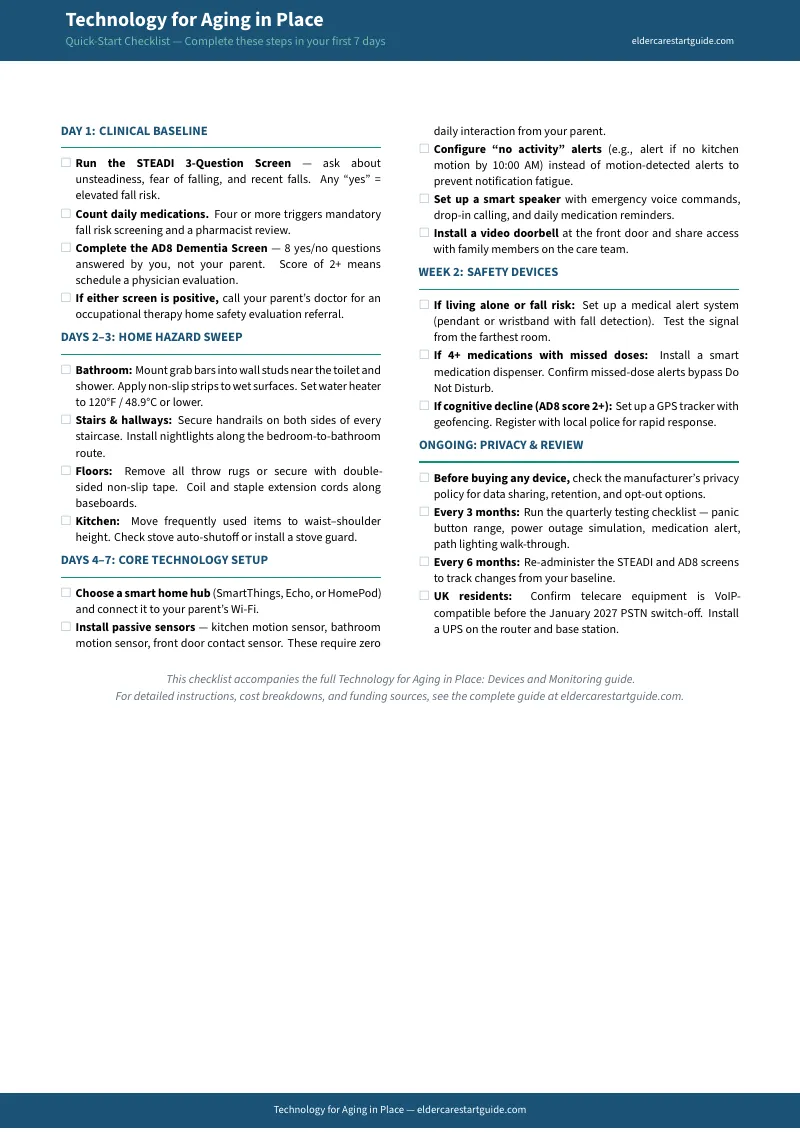
The Quick-Start Checklist gives you a 20-item technology assessment you can complete in one visit to your parent's home. It's free, it's immediate, and it will show you exactly where the gaps are.
The full Technology for Aging in Place guide — at — gives you the clinical framework, device selection system, privacy compliance protocols, funding pathways, and step-by-step setup instructions to close those gaps permanently.
Frequently Asked Questions
What if the rules change after I buy?
We update the guide when the rules change. Email us any time, even years later, and we'll send you the current edition free.