You Have the Passwords. You Don't Have the Access.
There's a notebook in your parent's kitchen with their passwords written in pencil. Or maybe a Notes app on their phone. Or maybe nothing at all — just the vague understanding that "Mom knows all her passwords."
And that works fine. Until it doesn't.
A fall lands your mother in the hospital, and you need to check her MyChart portal for medication lists and upcoming appointments. But the portal sends a verification code to her phone — which is locked in her purse at the nursing station. Her email is the recovery option, but her email also requires a code sent to that same phone. You're locked out of everything, standing in a hospital corridor, while a discharge planner asks questions you can't answer.
Or maybe the crisis is slower: unpaid utility bills piling up because your father switched to paperless billing and then stopped checking his email. A credit card charge you don't recognize. A "tech support" call that convinced your parent to install remote-access software on their computer.
The common thread: a static list of passwords cannot solve any of these problems. Modern accounts are protected by two-factor authentication, device-trust verification, biometric locks, and fraud-detection algorithms that actively block unfamiliar logins. The sticky note doesn't know about any of that.
The Digital Access Blueprint — a System That Holds Under Pressure
This toolkit replaces fragile password lists with a layered security and access system designed to work whether your parent is healthy, gradually declining, or suddenly incapacitated. It bridges the gap between informal "I know the password" access and the legal, technical, and administrative infrastructure that actually grants you authority over someone else's digital life.
That bridge is what makes this different from a password manager, a legal document engine, or a free government checklist. Those tools solve one layer. This toolkit connects all of them into a single, resilient system — the Digital Access Blueprint.
What's Inside the Full Toolkit
- Platform legacy settings walkthrough — step-by-step configuration for Apple Legacy Contact, Google Inactive Account Manager, Facebook Legacy Contact, and Microsoft account recovery. These built-in tools carry the highest legal priority under RUFADAA — higher than your parent's Will. Each one takes five to fifteen minutes to set up, and the guide walks you through every screen.
- Password vault setup for non-technical parents — a migration path from paper notes to an encrypted password manager, with emergency access protocols that let you retrieve credentials without your parent's involvement during a crisis. Includes comparison guidance for choosing between 1Password, Bitwarden, and Apple Keychain based on your family's technical comfort level.
- RUFADAA-compliant Power of Attorney language — the specific legal clauses your POA needs to include so that banks, email providers, and tech companies actually honor it. Standard POAs drafted before 2016 almost certainly lack these provisions, and institutions routinely reject POAs without them. Take these clauses to your estate attorney — they slot directly into an existing document.
- Healthcare and government authorization tracker — a one-page status sheet for CMS-10106, CMS-1696, SSA Representative Payee, NHS proxy, Service Canada ISP-1603, CRA AUT-01, and My Health Record so you know which filings are done.
- Scam and fraud prevention hardening — device-level protections that block the attack vectors most commonly used against seniors. Silence unknown callers, restrict app downloads, configure email safe-sender lists, enable location sharing, and execute credit freezes across all three bureaus. Each step is a concrete setting change, not general advice.
- The Sibling Administrative Accord — a template agreement that defines who has full administrative authority, who gets view-only access, and how every financial action is logged and shared. It turns "I don't trust what you're doing with Dad's accounts" into a transparent, auditable system.
- Family conversation scripts — exact language for the conversation your parent doesn't want to have. The scripts use a "collaborative safeguarding" frame that preserves dignity and autonomy, positioning you as a backup rather than a replacement. Includes prompts for the reluctant parent, the defensive parent, and the parent who insists nothing is wrong.
- 90-day implementation timeline — a phased rollout that starts with the highest-risk accounts (banking, email, healthcare portals) and expands outward. Clear milestones at 30, 60, and 90 days, plus a semi-annual Digital Access Maintenance Checklist.
- Digital footprint inventory template — a structured audit framework for cataloging every account across financial, healthcare, utility, social media, cloud storage, and subscription categories. Records login URLs, 2FA methods, legacy contact status, and required actions for each account.
- SSA Representative Payee roadmap — Social Security does not recognize standard Powers of Attorney. If your parent can no longer manage their own benefits, you need to apply as a Representative Payee. The toolkit walks through the application process, documentation requirements, and annual reporting obligations.
Who This Toolkit Is For
You're an adult child who has gradually — or suddenly — become responsible for a parent's administrative life. Maybe you live nearby and see the signs: forgotten passwords, unopened bills, confusion navigating a phone that used to be second nature. Maybe you're managing from three states away, trying to coordinate care through a screen.
You might be the only sibling stepping up, or you might be one of several who can't agree on what to do. You might have a cooperative parent who wants help, or a defensive one who insists they're fine.
Whatever the configuration, you've hit the same wall: knowing you need to take over some or all of your parent's digital life, but not knowing how to do it securely, legally, and without damaging the relationship.
Why Not Just Google It?
You can find pieces of this information scattered across government websites, Reddit threads, elder-law blog posts, and tech support forums. The problem is assembly. The CFPB guide on managing someone else's money doesn't explain how to configure Google Inactive Account Manager. The Reddit thread about password managers for elderly parents doesn't cover RUFADAA compliance. The elder-law attorney's blog post about digital POA provisions doesn't tell you how to freeze credit at all three bureaus while you update the POA.
And none of them sequence the work in the right order. Configuring a password vault before setting up platform legacy contacts wastes effort — the legacy contacts carry higher legal priority and take less time. Setting up bill monitoring before executing credit freezes leaves the biggest vulnerability open while you work on a smaller one.
This toolkit connects all the layers in the right sequence, with the specific details that make each step actually work when you present it to a bank teller, a customer support agent, or a sibling who wants to know what you've been doing with Dad's accounts.
The Free Checklist vs. the Full Toolkit
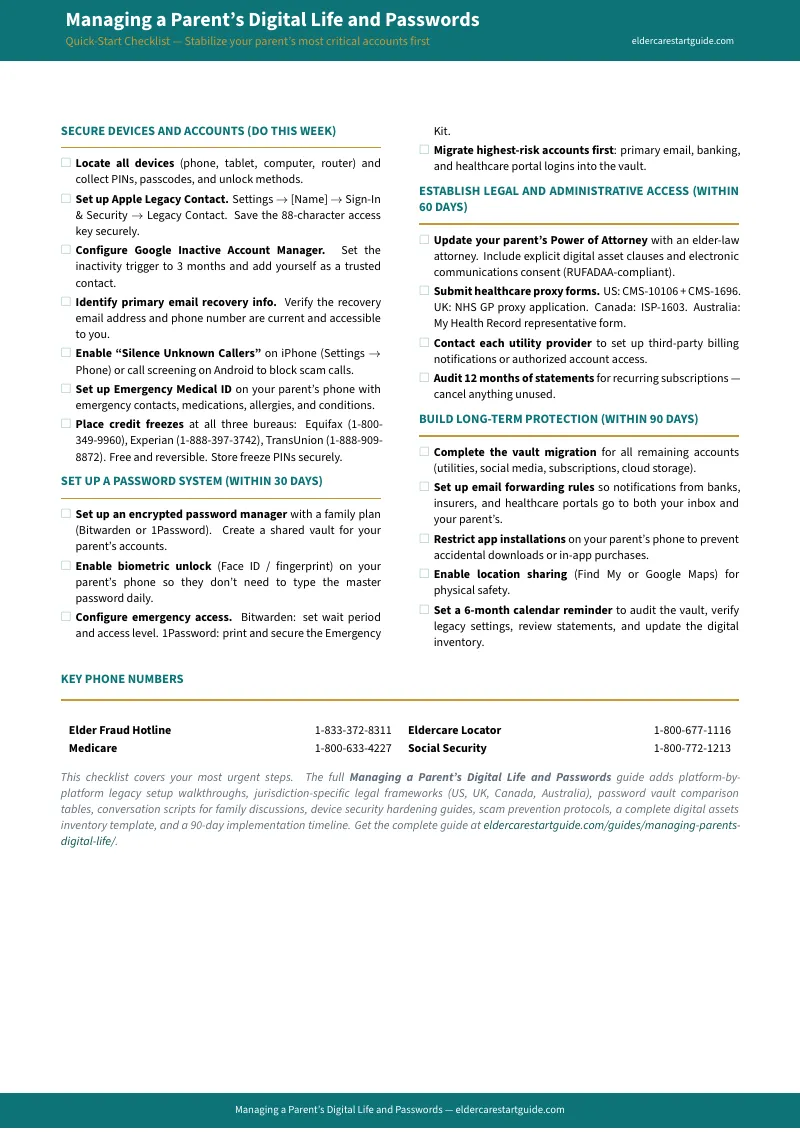
The free checklist gives you a prioritized action list — the twenty most important steps, in order, to stabilize your parent's digital life in a single sitting. It's enough to handle an immediate crisis and establish basic protections.
The full toolkit adds the depth that turns a crisis response into a permanent system: platform walkthroughs with screenshots, legal document templates, conversation scripts, the Sibling Administrative Accord, and the ongoing monitoring routines that catch problems weeks before they become emergencies.
Start with the checklist. If the first three items reveal how much you've been missing, the full toolkit is waiting.
What This Is Not
This is not legal advice — it's process navigation. The RUFADAA clauses and consent forms are templates for your estate attorney to review and customize. The SSA Representative Payee section explains the process; it doesn't replace the formal application. And the scam prevention steps are technical configurations, not a substitute for law enforcement if fraud has already occurred.
What it is: the practical middle layer between "I should probably figure out my parent's passwords" and actually having a secure, legal, documented system that works when it matters most.
Your parent's digital life doesn't have to be a crisis waiting to happen.